
Last updated on
Nov 7, 2026
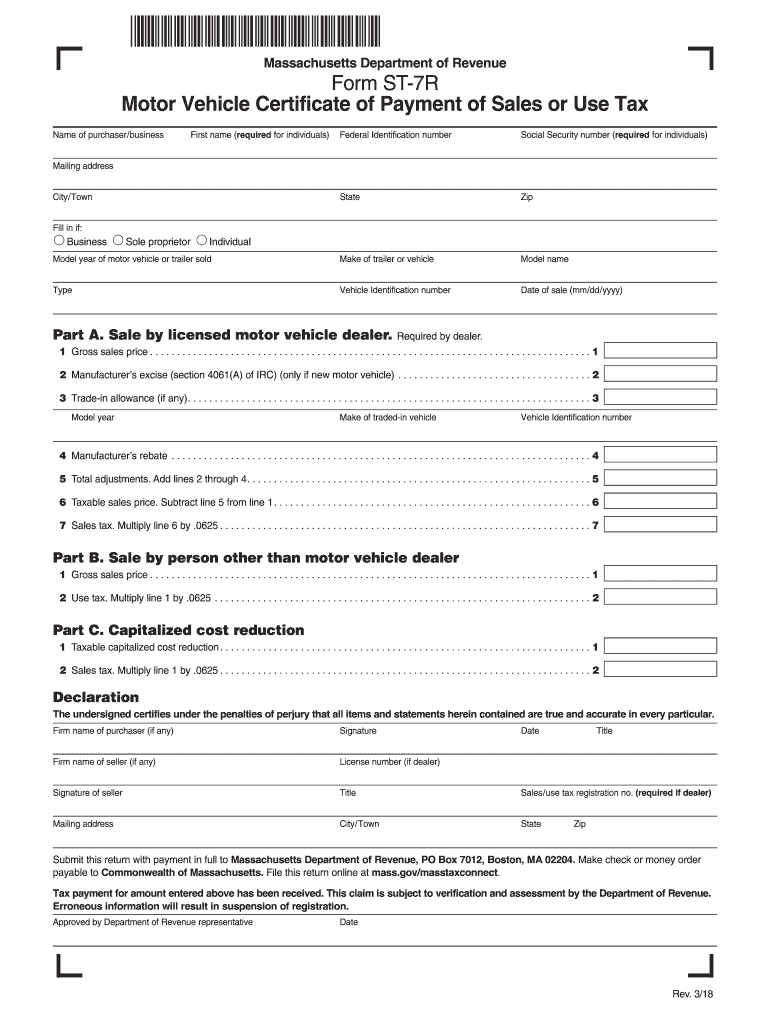
MA ST-7R 2018-2026 free printable template
pdfFiller is not affiliated with any government organization

Fill out
Complete the form online in a simple drag-and-drop editor.

eSign
Add your legally binding signature or send the form for signing.

Share
Share the form via a link, letting anyone fill it out from any device.

Export
Download, print, email, or move the form to your cloud storage.
Why pdfFiller is the best tool for your documents and forms


End-to-end document management
From editing and signing to collaboration and tracking, pdfFiller has everything you need to get your documents done quickly and efficiently.
Accessible from anywhere
pdfFiller is fully cloud-based. This means you can edit, sign, and share documents from anywhere using your computer, smartphone, or tablet.
Secure and compliant
pdfFiller lets you securely manage documents following global laws like ESIGN, CCPA, and GDPR. It's also HIPAA and SOC 2 compliant.
What is MA ST-7R
The Massachusetts Form ST-7R is a tax form used by purchasers and sellers to certify sales or use tax on motor vehicles or trailers in Massachusetts.
pdfFiller scores top ratings on review platforms




Who needs MA ST-7R?
Explore how professionals across industries use pdfFiller.

MA ST-7R is needed by:
-
Individuals purchasing motor vehicles in Massachusetts
-
Sellers of motor vehicles in Massachusetts
-
Dealerships handling vehicle transactions
-
Tax professionals assisting clients with vehicle transactions
-
Individuals filing sales tax documentation
-
Businesses engaging in vehicle or trailer sales
Comprehensive Guide to MA ST-7R
What is the Massachusetts Form ST-7R?
The Massachusetts Form ST-7R is a tax document essential for certifying the payment of sales or use tax on motor vehicles or trailers in Massachusetts. This form plays a vital role in motor vehicle transactions, ensuring both parties fulfill their tax obligations during a sale.
This document serves as proof that the purchaser has paid the required tax, simplifying the transaction process while complying with state regulations.
Purpose and Benefits of the Massachusetts Form ST-7R
The primary role of the Massachusetts Form ST-7R is to certify that sales or use tax has been paid on motor vehicles, facilitating a smoother transfer of ownership between sellers and purchasers.
Key benefits include:
-
Streamlining the tax payment process for both parties.
-
Providing documentation needed for registration and title transfers.
-
Helping buyers avoid future tax liabilities.
Who Needs the Massachusetts Form ST-7R?
Both purchasers and sellers are required to complete the Massachusetts Form ST-7R during vehicle transactions. This includes private sales, dealerships, and any transfer of ownership that necessitates tax certification.
Scenarios in which the form is necessary include:
-
Purchasing a vehicle from a private seller.
-
Transferring ownership at a dealership.
-
Inheriting a vehicle or receiving it as a gift.
How to Fill Out the Massachusetts Form ST-7R Online
Filling out the Massachusetts Form ST-7R online is a simple process when using pdfFiller. Follow these steps:
-
Access the Massachusetts Form ST-7R on pdfFiller.
-
Fill in the required fields such as the purchaser's name and vehicle details.
-
Review the information for accuracy.
-
Submit the completed form electronically.
pdfFiller ensures a secure and efficient way to handle your tax form submissions.
Field-by-Field Instructions for the Massachusetts Form ST-7R
Each section of the Massachusetts Form ST-7R requires specific information. Key fields include:
-
Name of the purchaser or business.
-
Mailing address.
-
Model year of the motor vehicle or trailer sold.
-
Purchase price and tax calculation.
-
Signature of both parties involved in the transaction.
Providing accurate information in these fields is critical to avoid complications during submission.
When and Where to Submit the Massachusetts Form ST-7R
Submission of the Massachusetts Form ST-7R must be completed in a timely manner. Typically, forms should be submitted either at the time of purchase or prior to vehicle registration.
Consider these important details regarding submission:
-
Submit the completed form to the Massachusetts Department of Revenue.
-
Check for any associated fees and payment methods.
-
Verify specific deadlines based on the transaction type.
Common Errors to Avoid When Submitting the Massachusetts Form ST-7R
Many individuals make mistakes when completing the Massachusetts Form ST-7R. To avoid these errors:
-
Ensure that all fields are completed accurately.
-
Double-check vehicle details and tax calculations.
-
Review signatures from both purchaser and seller.
Taking time to review your form can prevent delays and complications in processing.
How to Check Your Application Status for the Massachusetts Form ST-7R
After submitting the Massachusetts Form ST-7R, tracking the submission status is essential. Follow these steps for checking your application:
-
Visit the Massachusetts Department of Revenue's website.
-
Navigate to the application status check section.
-
Enter the required identification information.
Expect standard processing times based on the Department of Revenue's guidelines.
Security and Compliance in Handling the Massachusetts Form ST-7R
When using pdfFiller for the Massachusetts Form ST-7R, rest assured that your data is protected. With 256-bit encryption and adherence to regulations like HIPAA and GDPR, your personal information remains confidential.
pdfFiller employs robust security measures to safeguard sensitive data during the submission process.
Get Started with pdfFiller for Your Massachusetts Form ST-7R
Utilize pdfFiller today to efficiently fill, edit, and eSign your Massachusetts Form ST-7R. The platform's user-friendly interface makes the process straightforward and accessible.
Discover the benefits of using pdfFiller for all your form-filling needs, ensuring compliance and security throughout the process.
How to fill out the MA ST-7R
-
1.Access pdfFiller and search for 'Massachusetts Form ST-7R' to find the form template.
-
2.Open the form to begin editing. Familiarize yourself with pdfFiller’s interface, which allows quick navigation through fields.
-
3.Before filling the form, gather necessary information, like the purchaser's name, mailing address, vehicle details, and tax calculations.
-
4.Start completing the form by clicking on the designated fields, entering the purchaser's business name and mailing address.
-
5.Proceed to fill in the vehicle details, including model year, make, and identification number.
-
6.Utilize checkboxes where applicable and refer to explicit instructions provided within the form for additional guidance.
-
7.Once all fields are filled accurately, review the form for any errors or omissions.
-
8.After verification, finalize the document by selecting the option to save or download it in your preferred format.
-
9.If applicable, submit the completed form electronically or print it for physical submission, following your preferred method outlined by the Massachusetts Department of Revenue.

Who is eligible to use the Massachusetts Form ST-7R?
The Massachusetts Form ST-7R can be used by individuals buying or selling motor vehicles and trailers in Massachusetts. Both parties must complete the necessary sections of the form to certify tax payments.
What is the deadline for submitting Form ST-7R?
While the form itself does not have a set deadline, it should be completed and submitted at the time of the vehicle transaction to ensure compliance with Massachusetts tax regulations.
How do I submit the Massachusetts Form ST-7R?
You can submit the Massachusetts Form ST-7R by mailing it to the Massachusetts Department of Revenue or by submitting it electronically if offered by your local tax authority.
What supporting documents are required with Form ST-7R?
Typically, no additional documents are required when submitting Form ST-7R; however, it is advisable to have proof of purchase, such as a bill of sale, readily available to support the information included.
What are common mistakes to avoid when filling out Form ST-7R?
Common mistakes include incorrect vehicle details, missing signatures from both parties, and failing to double-check calculations for sales or use tax. Ensure all fields are filled accurately to avoid delays.
How long does it take to process Form ST-7R?
Processing times for Form ST-7R can vary depending on submission methods. Generally, electronically submitted forms can be processed faster than mailed forms, which may take several weeks.
Are there any fees associated with filing Form ST-7R?
There are typically no fees specifically for filing Form ST-7R; however, associated vehicle taxes must be paid at the time of transaction, which is separate from the form submission process.
MA ST-7R Form Versions
Related Content
Related Forms



Related Catalogs
Get the latest insights from our blog


If you believe that this page should be taken down, please follow our DMCA take down process
here
.
This form may include fields for payment information. Data entered in these fields is not covered by PCI DSS compliance.